
In a previous post, I have wrote about how to add eSIM functions to POCO X3. This was using the 5ber SIM card and its app. I have tested this to be working on PixelOS Android 14
When I upgraded the phone to Android 15, the 5ber app stopped recognizing the SIM card. The same applies even after I have upgraded to crDroid Android 16. The SIM card is working fine as I can see there is an EID code in Device Information (*#06#). A few internet searches revealed that 5ber was experiencing some financial difficulties and was subsequently acquired.
The 5ber SIM card appears to be from China Mobile, (CMLink). I installed the CML app from Playstore and it could not recognize the SIM card too. The CML portal for purchasing profiles seems to be working but there is no facility to add third party profiles. After more internet searching, I found an XDA thread on using an open source app OpenEUICC to work with programmable SIM cards to load profiles.
OpenEUICC is a Local Profile Assistant for Android devices. Root is required as installation is via a Magisk module. Not surprising, as this is installing system level functions.
On a hunch, I tested using the OpenEUICC app to load a profile. Using the + icon and scanning the QR code, the profile was added successfully. The way to track the profile is to tap on the ICCID to reveal the number and match it against your order.
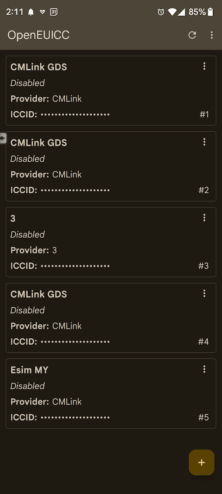
Tested the profile by connecting to a Malaysian Telco. The app’s UI left much to be desired, but it works. I could connect to the Internet and download several large files.
XDA thread on using programmable SIM
OpenEUICC app