
Pi-Hole is a open source DNS with add on scripts to block ads. I have test drive this on the old Docker on the Windows PC. I didn’t see much returns due DNS over HTTPS and shortage of resources, I put it aside.
Now with the Docker on Proxmox machine (server?) covered here, I thought try Pi-hole again. This time I set it as DNS in the router’s DHCP. Configure the Windows PC to receive DNS via DHCP and confirm I am receiving primary and secondary DNS servers.
I turned off DNS over HTTPS or “Use secure DNS”
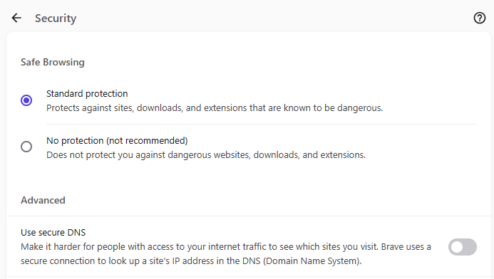
Surfed the Web as hard as I could, looks stable. Turned “Use secure DNS” back on the get some ads. Finally found an site streaming Asian shows. Every time I moved the mouse, a pop up appears.
Turned off “Use secure DNS”, the ads disappeared. There were some error messages, probably due to code referencing links blocked by Pi-Hole. Reloading the page clears this and smooth experience after.
Now to roll this out to the family. It is FIFA world cup 2026, should wait till after? 🙂